
 The heart of Hosea is a heart that is broken over and over again by the prophetic commands of Almighty God. How does he endure the shame of marrying the prostitute Gomer? His love for God exceeds his love for his own reputation. How does Hosea bear the horror of the Lord naming his children Jezreel, You Are Not My Beloved, and You Are Not My People? His love for God exceeds his love for his pride. When God commands him to redeem Gomer who has found herself in bondage to another man, why doesn’t he leave her there? His love for God exceeds his feelings of betrayal. Hosea places God in His proper place in his priorities and, because of this, he never denies a command of God, no matter the personal cost. Will you do the same?
Fools, Mockers, and Liars Oh MY! Veering Around Those Reprobate Arminians
I read this post a couple of weeks ago and responded but the brother has yet to elect (how very Calvinist) to moderate the comment. Entitled Are We to Have Any Fellowship with Arminians, the piece troubles me pastorally as it consists of a series of passages that supposedly indicate that the answer is no. Brother Chris, in your view of Calvinism those who adhere to a true Arminian belief system are lost to reprobation. This does not make them fools, mockers of God, or liars. From your perspective Chris, doesn’t your assurance of salvation assuage any concerns you would have in associating with people who love Christ (though He apparently doesn’t receive it.)
Chris, as I mentioned before, I found this other passage in the Bible that you might want to add to your posting:
1 Peter 3:15 But in your hearts set apart Christ as Lord. Always be prepared to give an answer to everyone who asks you to give the reason for the hope that you have. But do this with gentleness and respect…
Peace Chris.
God’s Ground Force by Barbara Sullivan
Often, books about being the Church or how to do Church fly under the radar because they didn’t have the cachet of a well known pastor’s name on the byline. Sometimes they disappear after their first print run and other times they become underground classics like Love, Acceptance & Forgiveness and The Church Unleashed still sought on the second hand market years after they gone out of print. A recent book that has not received the attention it deserves is God’s Ground Force, written by Barbara Sullivan in 2006. The journey from  call to full blown ministry as Restoration ministries captivates you from page one as Barbara’s plain-spoken wording invites you to seek out parallels in your own life to her experiences.
The story recounts the variety of growth experiences that formed her church and ministry and gives us many insights on how it affected her family and relationships. Realizing that obedience to God’s call came above all else was the key to her discovery of the ‘more’ in the statement, ‘there has to be more to life.’ By allowing the Spirit to freely guide their choices and actions, the Sullivans have been at the center of a Spirit centered ministry as followers. Contrast this with the marketing approach so many planters take today in which they sense the call but then push the Spirit aside, thinking that once they have been given the assignment they must rely on their own abilities to facilitate the birth and growth of the body.
You can read the book in a day or two but you won’t. At each juncture, you will sense the Spirit prodding you. Perhaps it is with an assignment or a change of course, the secret Barbara reminds us is to turn over the reins to God and let Him run the show. It’s hard to argue with the results she shares on the pages of this fine book. Don’t overlook this one.
Real Dangerous Worship
As we come toward the end of another week, for most churches, worship planning for Sunday is well underway. The sermon is taking shape, the songs and prayers will be selected and rehearsed, sound and video are setting up their cues and yet, once again we will fail in our purpose. We will not encounter God, who hardly feels constrained by the boundaries that we lay out around our idea of worship, but we will come face to face with our idol, ourselves.
Labberton continues to challenge in The Dangerous Act of Worship, pointing out that our biggest downfall as followers of God comes from the fact that we don’t realize that our beliefs or the transformed lives that derive from beliefs matter as much as the Bible suggests. We willing to settle for lives that circle around the ‘I’ idol instead of yearning to meet the God of consuming fire and immeasurable righteousness.
We are desperate to tame God in order to avoid the changes that an unfettered God would bring about in our lives. We seek out a God who is what we want and run and hide from any possible influence of the God who is. As a result our worship is filled with lies; we proclaim Him as Lord and the object of our love and yet we hate our neighbor, avoid the oppressed, forget the widow, and withhold nourishment from the starving.
Our worship makes light of the false dangers and avoids the real. Worship is to be transformative, change us as people and changing the world through our influence. Anything less is too safe. Instead of noting the time when we enter the sanctuary we should beg others to tie a rope around our leg as we approach the alter for fear that the awe of actually being in the presence of the almighty God should actually lead us away to a place from which we cannot return.
Blog Categories in Word 2007
Many blog hosts support categories, including WordPress where this blog is hosted. Though many argue that in a Web 2.0 world, tags have superseded categories for classifying posts, that’s an argument for another day. Including a Categories entry for your sidebar gives your readers quick access to your collected wisdom on a topic. The question at hand then is, what kind of support does Word offer for the blogger?
Inserting a Category
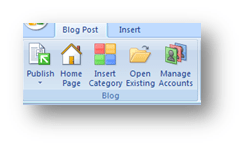
When you have set up your blog connection, the categories that you have already defined in WordPress will be recognized and made available to your post. On the Ribbon, your first group is the Blog group in which the Insert Category button lives. Clicking on this button will insert a drop-down box at the top of your post.

When you click on the drop-down, you can select one of your categories. Publishing your post will pass this data to WordPress and your entry will be appropriately classified. Want to include a post in more than one category? Click on the Insert Category button again and select another category.
Adding a New Category
The Category drop down box tempts you with the invitation to ‘type a new one’ to add a category to your WordPress list. Don’t be fooled. This function does not appear to work and each test that I did succeeded in pushing my post into the uncategorized category. The only workaround I have found right now is to go to the blog control center and add the category there. Update your entry and publish it. We’ll watch for a fix for this in the future.
A Word 2007 Shortcut for Blogging
One of things that make the blogging life easier is having simple, click-to-open access to your tools. Choosing Word 2007 as your client might not seem to be worth the effort on first glance. Right out of the box, creating a new post is a three step process.
- You’ll start Word which creates a default empty document.
- Then you’ll click the Office Button

- and then select Blog Post from the menu.
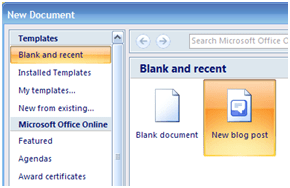
Seems like way too much work for me. Perhaps we ought to make a shortcut to simplify the whole process.
Creating a Word Blogging Shortcut
Word documents are based on templates that contain the formatting information for each type of document that you create and the blog post is no exception. Word supports command line switches so, with a little creative shortcutting we can override the Normal.dotx template with the Blog.dotx template and start the word processor in blog posting mode. Once you’ve located everything the process is a piece of cake. Watch.
- The first thing you need to do is gather some information. You’ll need to identify the locations of the two files you are going to use, Winword.exe and Blog.dotx. Their default locations are:
- Winword.exe F C:\Program Files\Microsoft Office\Office12\WINWORD.EXE
- Blog.dotx F C:\Program Files\Microsoft Office\Templates\1033\Blog.dotx
- Right click on the desktop and select New-Shortcut from the context menu. You’ll troubles will be rewarded with this:
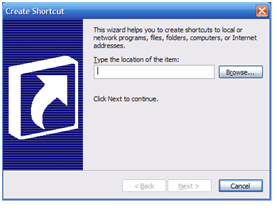
- You are going to use two of Word’s switches:
- /q – starts Word without the splash screen
- /t – starts Word with a specified template
- In the data field, type the following line being sure to make any changes needed to accommodate your folder structure. The double quotes are necessary because of the spaces in the path. Also be sure to note that there is no space between the /t switch and the template name. Inserting a space there will open the template for editing and you don’t want to do that. At least not right now.
- “C:\Program Files\Microsoft Office\Office12\WINWORD.EXE” /q /t”C:\Program Files\Microsoft Office\Templates\1033\Blog.dotx”

- “C:\Program Files\Microsoft Office\Office12\WINWORD.EXE” /q /t”C:\Program Files\Microsoft Office\Templates\1033\Blog.dotx”
- Click Next and you’ll be asked to name the shortcut. You’re a blogger, be creative.
- Tada!

That should keep you occupied for today. Next, we’ll start checking out some of the features that Word brings to the game.
Signs of Hope
My time with the athletes at Special Olympics events carves out a special place in my heart for God’s ‘special children’. This piece by Bill Johnson
caught my eye and heart this morning. It will surely bring a smile to your face as well. Be well.
Blogging with Word 2007

Writers have a wide variety of choices when considering what tool to use in composing their blog posts. The internal editor of the blog software (e.g. WordPress, Blogger, etc.) is the simplest choice and it probably does the job for the majority of posts. When the writer wants to get a little more complex in their layout capabilities or have access to other editing tools, an external client is usually chosen. The editor must recognize the API of the writer’s blog host, but aside from that, most do a pretty good job in pretty much the same way. I’ve been using Windows LiveWriter for some time now and I am pleased with the results. It supports plug-ins, some nice image formatting, good text formatting tools, drafts with only one or two annoying proclivities (when it uploads an image to WordPress, it sends the image twice). Why consider Word as a blog client then? Two reasons; I like simplicity and if I can narrow my software installation down by using a multitasker then I’m happier and second, Microsoft has recognized the blogosphere big time and they have included new blogging features in Word and I want to see how well it will work.
Creating a New Post
Today we’ll examine Word’s capabilities by creating the post that you’re now reading. The blogging tools are enabled when you select New, and Blog. The template is set up with a title bar and a nice clean work area below. The new Ribbon interface that replaces the old menu and toolbar interface provides you with context specific tools as Word takes notice of what you are working on. For example, when the image was inserted, a new ribbon becomes visible with the image positioning and editing tools. When the focus shifts from the image, the ribbon vanishes keeping the interface clear. It takes some getting used to but in the end, it is going to prove to be a step forward in interface design.
Publishing
Your Entry
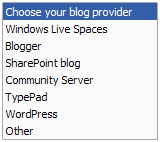 Setting up your blog host is a simple process as long as your host is a recognized provider (as shown in the choices at right) or it uses a known API. The step by step setup will ask all of the expected questions to create a publishing connection and you’re ready to go. Any categories that you have defined will be downloaded from your site and can be inserted into your post before publishing it. When the entry is ready, click on the Publish button and your post is sent to your blog for the world to admire.
We’ll look at the tool in greater detail in the days to come as I try more of the features but for now I’m satisfied but not overwhelmed. Are there any immediate features missing? As far as I can tell there is no way to insert tags but I may be simply missing the feature. Time will tell.
Social Justice in the Rockies
Is it a social justice issue when your baseball team is already five games out after three weeks of the season?
Killing Me With Words
If someone is attacking your reputation and character, you come back with all guns blazing, right? Proverbs 22:1 says “A good name is more desirable than great riches; to be esteemed is better than silver or gold.” When your good name is the subject of a smear, you should go out of your way to correct those who mention it, shouldn’t you?
Interesting questions and currently, a subject of great struggle for me. If the character assassination were limited to me personally it would be much easier to deal with but my reputation affects my church and my family as well. Its seems as though I’m letting them down when I don’t confront the incorrect stories but, at the same time, so many before me have managed to ‘turn the other cheek.’
Turning a desire for retribution away is made possible only by spiritual maturity and trust. The question I must ask myself when I feel the anger welling up at the perpetrators is where do I put my trust? Is my faith in my own abilities to correct the situation or in God’s ability to work good from bad? I pray the second but must work with diligence to control the first.
Ecclesiastes wrote (7:1) that “a good name is better than fine perfume, and the day of death better than the day of birth.” Reading on in the passage, he explains this to mean that we learn more from hard times than from good times. This is certainly a truth but that doesn’t make it any easier. The broken parts in me still long to right the situation.
Here is a great post on reputation.

